


Demo Spellbook, get an Oura Ring 5*
See how Spellbook helps legal teams draft contracts faster than ever before.
Book Demo
7 Best AI Contract Drafting Software for Legal Teams in 2026
.jpeg)

The best AI contract drafting software in 2026 is Spellbook, followed by Ironclad CLM, Leah, Juro, PandaDoc, Aline, and Draftwise. AI contract drafting software is legal-specific artificial intelligence that generates clauses, revises language, and assembles full agreements from a team's own precedents and playbooks, most often directly inside Microsoft Word. The category spans lightweight AI Word add-ins that draft contracts clause by clause through to full Contract Lifecycle Management (CLM) platforms that route approvals across departments.
For a transactional lawyer, the drag is mechanical: redlining the same indemnification clause four times in one week, or losing a counterparty markup in an email thread nobody can find. This guide compares the seven best AI contract drafting software tools using a transparent evaluation methodology, then gives a selection framework organized by team size, workflow, and data privacy requirements.
Key Takeaways
- Contract drafting software ranges from lightweight Word add-ins to enterprise CLM platforms. The best choice depends on your workflow.
- Data privacy is non-negotiable for legal work. Before adopting any AI tool, verify that it meets the security and privacy standards required to protect legal work and support compliance with professional and ethical obligations.
- AI can handle burdensome tasks during contract drafting, while lawyers provide the legal judgment, strategy, and final sign-off.
[cta-1]
Evaluation Criteria for 7 Contract Drafting Tools
Most contract drafting software rankings evaluate tools the way a general SaaS buyer would: features, pricing, and G2 scores. We scored seven tools the way a legal operations manager would, starting with AI capabilities and ending with the question most rankings skip entirely: what does this vendor do with your data? Because drafting and redlining sit side by side in daily practice, we also weighed how each tool handles redline software features alongside pure clause generation.
- AI Drafting Capabilities: Can the tool generate, suggest, or improve clause-level language using AI? Did the vendor tune the AI for legal work, or is it a generic AI model?
- Integration with Legal Workflows: Does it work in Microsoft Word, connect to your CRM, or integrate with your document management system? Or does it require you to draft contracts in a separate platform?
- Ease of Adoption: Can a lawyer start using it almost immediately, or does it require a multi-month implementation with dedicated IT resources?
- Team Size Fit: Is it suited to a five-person in-house legal team, a 200-lawyer firm, or an enterprise legal ops department managing thousands of agreements?
- Data Privacy and Privilege Protection: Does the vendor offer the legal-grade security and data privacy measures the work requires, such as Zero Data Retention (ZDR) policies, privilege-safe architecture, SOC 2 Type II certification, GDPR and CCPA data residency controls, and audit-ready traceability logs?
Contract Drafting Software: At a Glance
Here is a quick-reference snapshot for readers who want a shortlist before reading the full evaluation.
The 7 Best Contract Drafting Software Tools for Legal Teams
Most contract drafting software lists lump a wide range of tools under a single category. But a Word add-in that drafts clauses in a sidebar on your screen varies significantly from an enterprise CLM platform that routes approvals across six departments. Each tool below varies in the tasks it performs and the teams it serves best, so teams that prefer a persona-first shortlist can also compare the best AI tools for contract lawyers before narrowing the field.
1. Spellbook
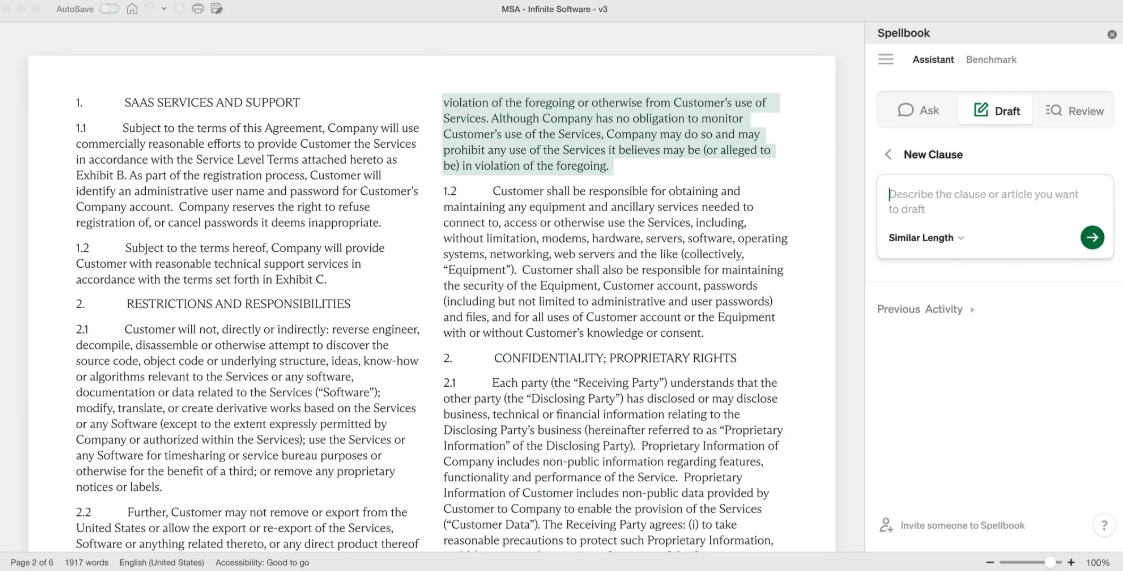
Spellbook is a leading AI-powered contract drafting software, purpose-built for practicing lawyers and transactional workflows. It works entirely within Microsoft Word as a native add-in to help eliminate copy-paste tasks and context switching to other tools.
Spellbook's legal-specific training powers automated clause generation, redlining, and playbook enforcement, directly in the environment where lawyers already work. Spellbook's data privacy architecture also sets it apart from other tools. It offers:
- Zero Data Retention (ZDR), which means inputs are processed in memory, deleted immediately, and never used to train the underlying model.
- Privilege-safe architecture, so your data does not mix with other clients' data.
- SOC 2 Type II certification, along with full GDPR and CCPA/CPRA data residency controls.
- Audit-ready logs of who accessed which data and when, for internal investigations and compliance audits.
Key Features
- Spellbook Associate, the agentic AI feature, can reason across multiple documents. You can give it a term sheet and ask it to draft the corresponding closing documents, helping keep terms consistent across the set.
- The Compare to Market feature offers access to a database of clause benchmarks, so you can see whether terms such as indemnification or liability caps are market-standard or aggressive.
- Scan incoming third-party paper against your company's legal playbook to flag non-compliant language and suggest pre-approved alternatives.
Pros: Spellbook accelerates contract drafting and review without forcing lawyers into a new system. Because lawyers draft in Word, there is almost no hurdle to adoption. It provides a fast return on investment (ROI) for drafting-heavy teams and now supports over 5,000 in-house teams and law firms.
Cons: Spellbook is not a full CLM and does not manage post-signature workflows such as approvals, storage, or renewals. It requires Microsoft 365.
Pricing note: Custom and per-seat, set by the number of team members on a license, with a seven-day free trial.
Best for: In-house teams and law firm associates who spend most of their day working in Word and want to automate the drudgery of redlining and clause hunting without switching tabs.
2. Ironclad CLM
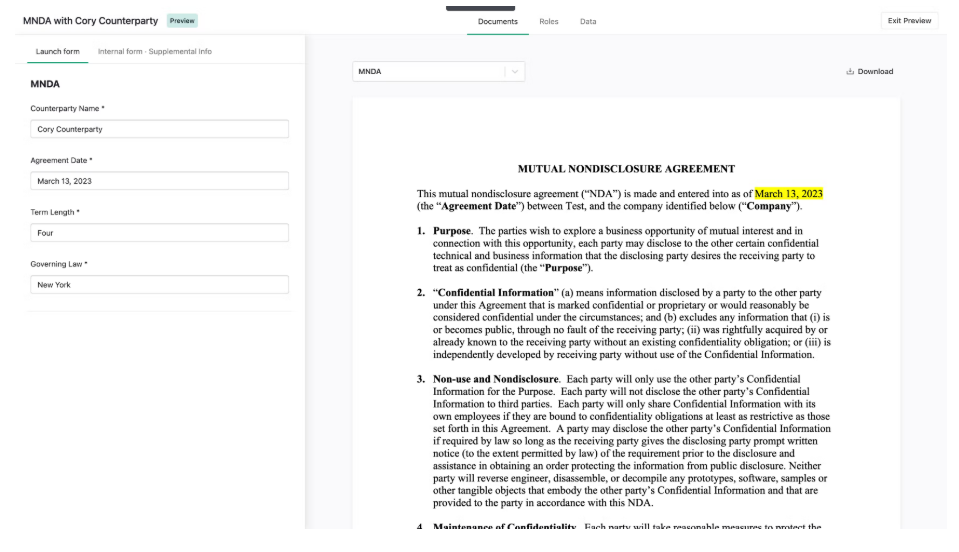
Ironclad is an enterprise CLM platform for legal teams managing high volumes of contracts across multiple departments. It aids professionals across the full contract lifecycle, including creation, approval, execution, storage, and analytics.
Key Features
- Visual workflow automation for approvals and multi-stakeholder routing
- Centralized contract repository with full-text search and structured metadata
- Salesforce CRM integration for syncing contract data with deal pipelines
- Real-time collaboration for negotiation and counterparty redlining
- Reporting and legal analytics for contract cycle time and compliance tracking
- SOC 2 Type II and ISO 27001 certified, GDPR and HIPAA compliant. Supports data masking, anonymization, and opt-outs for AI training, with bring-your-own-key (BYOK) encryption and role-based access controls.
Pros: If your problem is processing contracts at scale, you need a CLM solution like this. Ironclad tracks contract versions and maintains a full audit trail across the entire lifecycle.
Cons: Setup can take weeks or months and require dedicated project management. Ironclad is priced for enterprise budgets, which can put it out of reach for smaller teams.
Pricing note: Custom quotes only. Industry sources report pricing in the $30K to $150K+ annual range.
Best for: Legal departments in large organizations that need to standardize how contracts move through the business, with high-volume contract workflows across multiple business units.
3. Leah (formerly ContractPodAi)
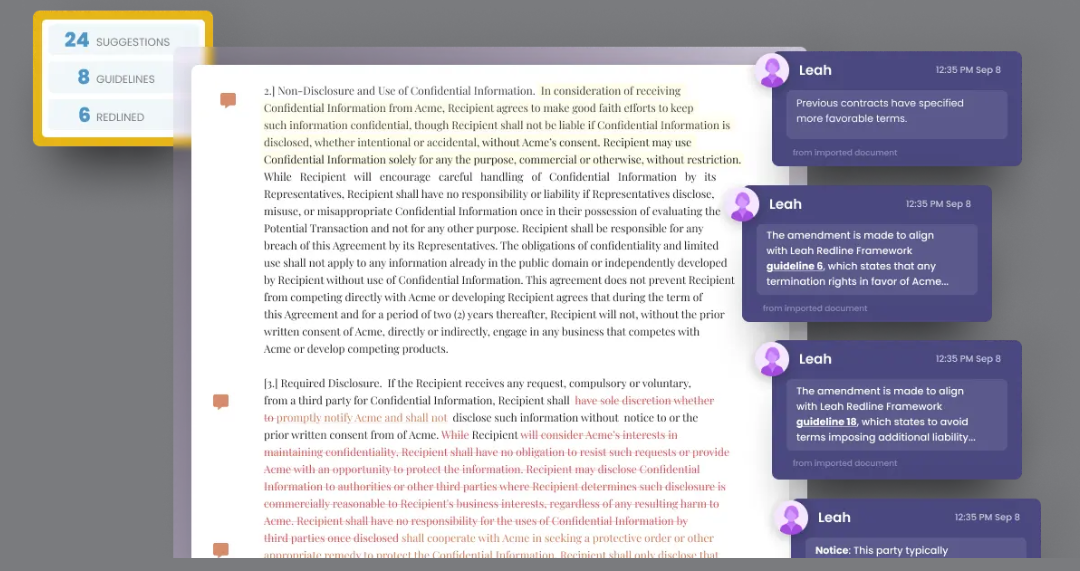
Leah, rebranded from ContractPodAi in January 2026, is an AI-powered CLM platform for mid- to large-sized in-house legal teams. The vendor reports recognition as a CLM Visionary by Gartner for five consecutive years and a Leader placement in the 2025 IDC MarketScape.
While it manages the full contract lifecycle, Leah's 2026 focus is on autonomous agents that handle document review, risk discovery, and cross-departmental orchestration.
Key Features
- Clause extraction and risk identification across existing contract portfolios
- Automated obligation and deadline tracking with configurable alerts
- Pre-built clause library and template management for standardized drafting
- Contract request intake and self-service hub for business teams
- Integration with Microsoft 365, Salesforce, and DocuSign
- SOC 1 and SOC 2 (Type 1 and 2) compliant, GDPR and CCPA compliant, HIPAA-ready
- Dedicated cloud compute with tenant-specific data isolation, so your data does not mingle with other clients' data during AI processing
- Private cloud environments available via Azure OpenAI Studio
Pros: The Agentic OS lets team leaders deploy AI agents that reason and act across legal, procurement, and finance workflows. Leah can also turn legacy contract PDFs into structured, searchable data. A self-service hub takes routine requests off legal's plate without sacrificing lawyer oversight.
Cons: The platform's integration with procurement and operational workflows can introduce complexity for teams focused solely on contract creation. The Agentic OS approach can lead to a steep learning curve and high administrative overhead.
Pricing note: Custom pricing with no public tiers. Implementation typically starts in the $50,000+ range, with costs varying based on AI usage and module depth.
Best for: Large in-house teams that want to move beyond basic storage and into proactive contract intelligence, especially those managing global portfolios with significant legacy paper.
4. Juro
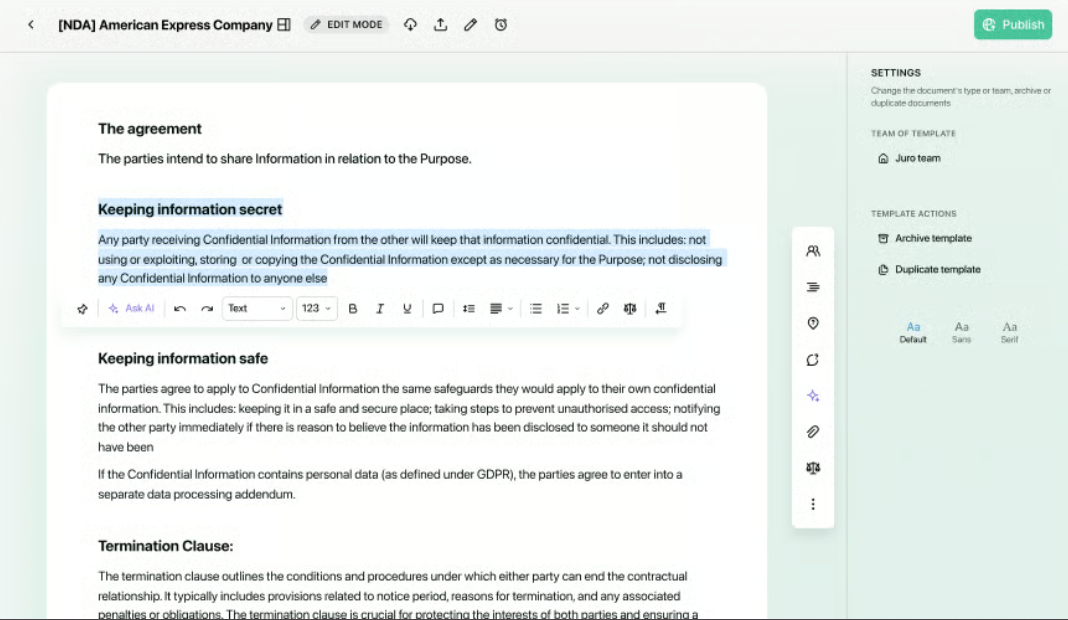
Juro is a browser-native contract platform where drafting, negotiation, and signing occur in a single shared workspace. It replaces the Word plus email plus DocuSign stack, enabling real-time collaboration among legal and business teams.
Key Features
- Browser-native contract editor. A shared workspace for drafting and negotiation where both parties can comment and edit in real time, similar to Google Docs but with legal-grade version control.
- AI review agents that read third-party contracts and suggest redlines based on your team's pre-set playbook and risk tolerance.
- A built-in, legally binding signature layer that removes the need for external tools such as DocuSign or HelloSign.
- Self-service automation. No-code logic that lets sales or HR teams generate complex contracts via simple question-and-answer forms.
- SOC 2 compliant with GDPR commitment at the platform level, including a detailed Data Processing Agreement (DPA) with Standard Contractual Clauses. Maintains documented incident response plans, cyber insurance, and sub-processor transparency.
Pros: Widely recognized as having the fastest implementation time in the CLM category. It is user-friendly for non-lawyers, which drives adoption across sales and commercial teams.
Cons: Juro's Word integration has improved, but the platform is still browser-first. Legal teams deeply wedded to complex Microsoft Word formatting may find the transition challenging, as some advanced styling may not translate perfectly between platforms.
Pricing note: Custom pricing. Entry-level plans are reported to start around $20/user/month, but enterprise-wide legal ops setups typically move to volume-based pricing.
Best for: Modern legal teams that want to end the back-and-forth of email attachments and let business units self-serve on routine agreements.
[cta-2]
5. PandaDoc
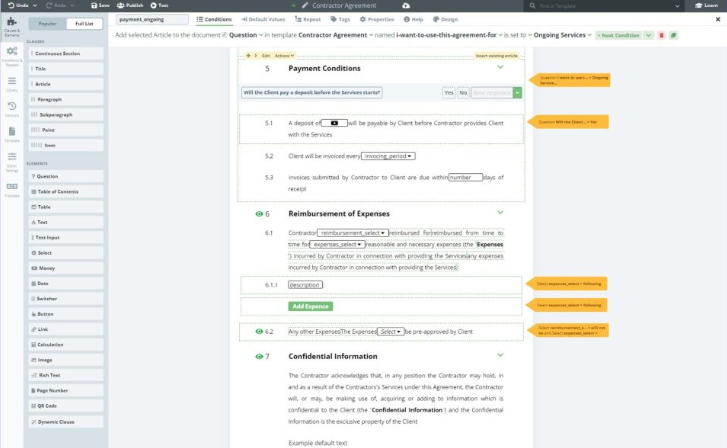
PandaDoc automates templated agreements such as proposals, statements of work (SOWs), and non-disclosure agreements (NDAs). Business users can generate and close standard agreements without involving legal in every step. It suits small and midsize businesses (SMBs) that send a high volume of repeatable paper.
Key Features
- An AI contract assistant that offers automated redlining suggestions and risk flagging for incoming third-party paper
- Content library for reusable clauses, pricing tables, and branded blocks
- Drag-and-drop document editor with customizable contract and proposal templates
- Document engagement analytics showing when recipients open, view, and sign
- Built-in e-signature, with CRM integrations for Salesforce, HubSpot, and Pipedrive for automated document generation
- HIPAA, GDPR, and eIDAS compliant, with SOC 2 Type II certification. Documents meet ESIGN Act and eIDAS standards for legally binding signatures.
Pros: AI drafting is optimized for standard commercial terms, which makes it effective for high-volume, repeatable documents. The drag-and-drop editor requires almost zero training for business users. Teams can generate, send, and close agreements quickly.
Cons: While it handles the send-and-sign step well, it lacks the post-signature obligation management and hierarchical reporting found in enterprise CLMs.
Pricing note: Starter starts at $19/user/month (annual). The Business tier at $49/user/month is required for CRM integrations (Salesforce and HubSpot).
Best for: Fast-moving SMBs and sales ops teams where the priority is removing the signature bottleneck for standard, repeatable agreements.
6. Aline
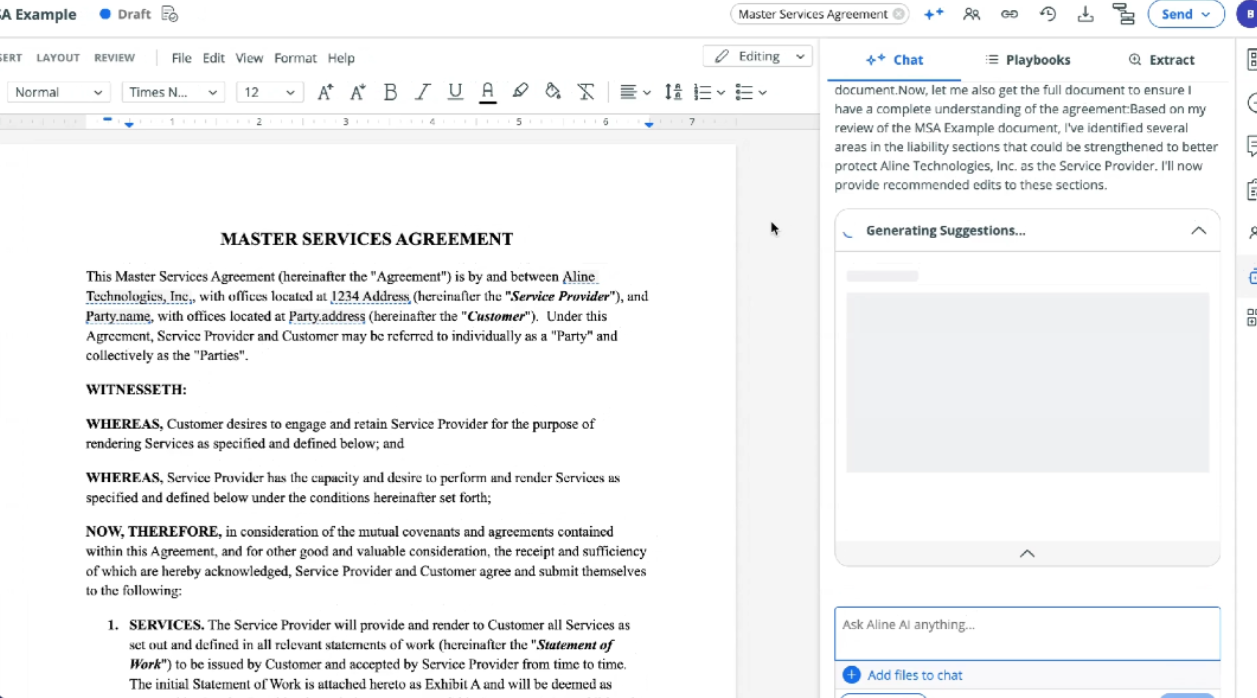
Aline is an AI-native contract drafting software platform that serves in-house legal and cross-functional teams. It covers the full contract workflow (drafting, negotiation, e-signature, and analytics) in a single system. AI playbooks, configurable approval routing, and built-in signing handle intake through execution.
Key Features
- AI-powered drafting and redlining using natural-language prompts. Aline Associate (AI chat) lets users ask natural-language questions across their entire contract library.
- AI playbooks built from standard templates
- Built-in e-signature (AlineSign) with multi-party signing workflows and audit trail
- Configurable approval workflows with intake routing and multi-step notifications via email or Slack
- Bi-directional data syncs with Salesforce, HubSpot, and Slack
- SOC 2 Type II certified. Aline states it does not train AI models on customer data and uses encryption at rest and in transit.
Note: Aline does not publicly commit to a Zero Data Retention (ZDR) architecture. Teams handling privileged work should confirm data handling and retention policies directly with Aline before deployment.
Pros: Aline reduces outside counsel spend by empowering non-lawyers to self-serve safely. Aline's no-code playbooks and intake flows make it easier for business teams to generate first drafts that incorporate standard terms.
Cons: As a newer product, Aline has a shorter track record than established CLM vendors. The primary editor is browser-based. Aline offers Word integration, but teams that want to work exclusively in Word will find the experience is secondary to the native editor.
Pricing note: Start a 21-day free trial. The team plan is $200/full user/month, with support users (view and approve only) at $50/month. Enterprise plans are custom-quoted and include CRM integrations.
Best for: In-house legal teams, startup founders, and cross-functional teams that want a single AI-powered platform from intake to signed agreement.
[cta-3]
7. Draftwise
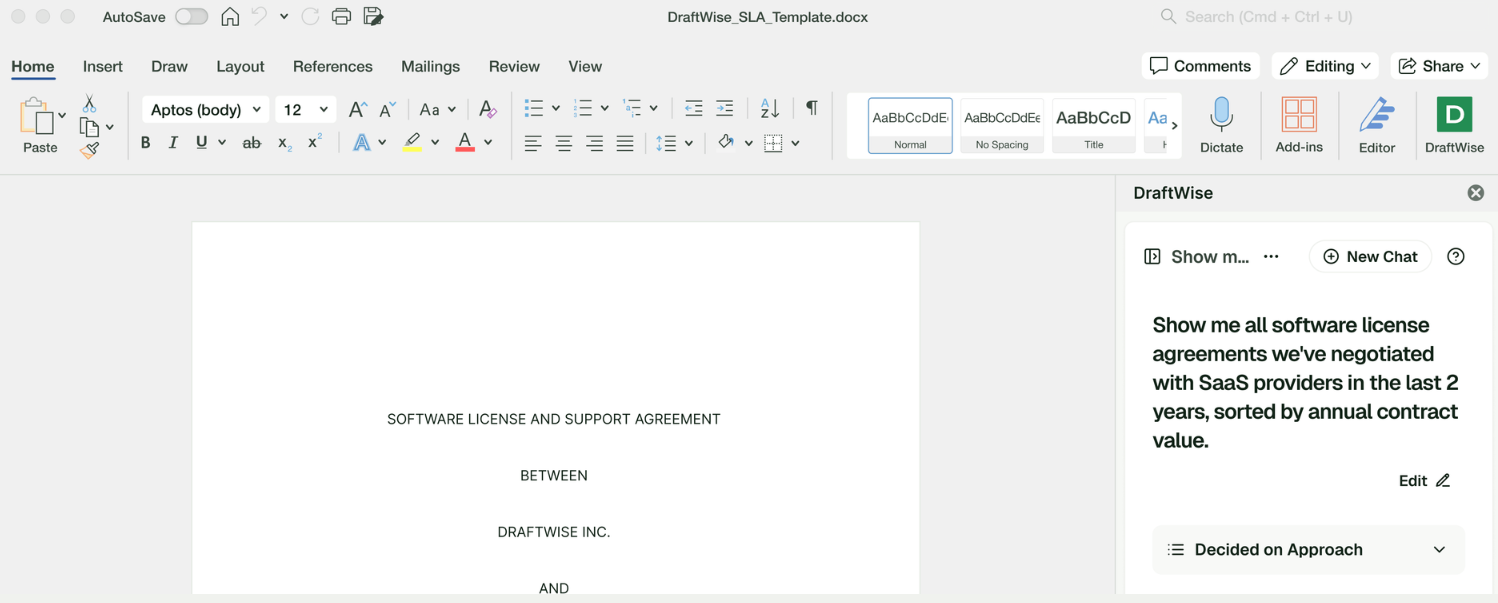
Draftwise is AI contract drafting software centered on one idea: your firm's own precedent library as the model. Draftwise pulls from your firm's own agreements to generate clauses, suggest edits, and guide negotiations, and it competes most directly with Word-native tools like the ones compared in our Spellbook versus Draftwise breakdown.
Key Features
- Playbook Studio generates a customized negotiation playbook by analyzing your repository to see which clauses you typically concede on and which you fight for.
- Real-time connections with iManage, NetDocuments, and SharePoint enable concept-based searching, such as finding all Most Favored Nation clauses even when they do not use those exact words.
- Compare your internal data with public datasets such as EDGAR to see whether your positions are typical for the industry.
- Automatic redline suggestions based on how your team has historically responded to a specific vendor or clause type
- Contractual Zero Data Retention (ZDR) with all LLM providers: client data is processed in memory, transmitted over encrypted channels, and never persists on external systems. Data is never used for model training.
- SOC 2 Type II and ISO 27001 certified, GDPR-compliant, and mirrors your document management system permissions.
Pros: Draftwise performs best with an extensive archive to learn from. It surfaces clauses that have already been negotiated and accepted, which makes suggestions more defensible. The direct connection to document management systems also means there is no separate migration or reindexing step.
Cons: Teams with an unorganized, poorly labeled, or small contract library will not get the same lift, and outputs are only as good as the underlying precedents. The advantage depends on data quality and volume.
Pricing note: Custom.
Best for: Teams with an extensive, structured contract repository that want to ground AI in their own deal history and negotiation patterns.
How to Choose the Ideal Contract Drafting Software
The best platform depends on how your team works, the other software in use, and how quickly you need it up and running. If your bottleneck is producing and reviewing agreements rather than routing them, contract authoring tools will usually deliver value faster than a full CLM. Start with four aspects:
- Existing Tech Ecosystem. If your lawyers work in Microsoft Word, tools with native Microsoft Word integration, such as Spellbook and Draftwise, will likely lead to higher adoption rates. However, deep CRM integration may matter more if your team runs on Salesforce.
- Team Size and Contract Volume. A five-person legal team drafting 50 NDAs a month has different needs than an enterprise department processing thousands of agreements across business units. Word add-ins like Spellbook and Draftwise shine when the bottleneck is producing and reviewing contracts. CLM platforms like Ironclad and Leah shine when the bottleneck is routing, tracking, and post-execution reporting.
- AI Capability and Data Privacy. Some AI tools offer legal fine-tuning; others bolt generic models onto a contract editor. The most important considerations are preventing the vendor from using your data to train AI models and from exposing it to third parties. For general counsel and compliance officers, this should be addressed before the demo.
- Ease of Adoption and Time to Value. Implementation timelines range from days (Spellbook, Juro) to months (Ironclad, Leah). If your team needs results this quarter, a Word add-in you can deploy in an afternoon beats a CLM platform that requires a six-month rollout and customization.
What are the Benefits of Contract Drafting Software?
In practice, contract drafting tools change certain parts of the contract drafting process more than others. The clearest gains come from AI-assisted contract drafting software features that reduce mechanical work. Here is where the differences appear in daily work.
- Faster First Drafts. Instead of writing an NDA from scratch, drafting software can draw on a clause library built on your standards and generate first-draft contracts from templates in minutes.
- Reduced Risk through automated playbook enforcement and initial review that flags non-standard and high-risk language.
- Fewer Version Control Errors. Version control and audit-trail features cut out the version nightmare of "final*v3*REVISED*JK*edits.docx." The software tracks and attributes every change.
- More Time for High-Value Work. Thomson Reuters reports that AI could free up as much as 240 hours per year per legal professional. Teams can redirect time away from mechanical drafting to strategy, client advisory, and negotiation.
- Faster Contract Cycles. Tools can speed up deal cycles by reducing back-and-forth negotiations. Integrations with CRM and procurement tools can connect data to contract workflows, measurably compressing cycle times.
Because these gains compound across a team, measuring the ROI of AI contract drafting early makes it easier to justify a wider rollout.
What Makes Spellbook Different from Other Contract Drafting Software?
Most contract tools force a change in workflow. Spellbook takes the opposite approach: the team designed it from day one for lawyers who draft contracts in Microsoft Word.
- Microsoft Word-native experience. Spellbook lives in Word as a native add-in. AI clause suggestions, redlines, and playbook checks all surface in a sidebar as you work in a familiar Word document. Ease of use matters here, because adoption is the hardest problem in legal tech.
- Legal-specific AI. Spellbook applies large language models such as GPT-5 and Claude to transactional legal work, grounded in legal-specific data. The Compare to Market feature lets lawyers see how their contract terms compare against real market data from more than 20 million contracts.
- Data privacy with no ambiguity. Spellbook runs with zero data retention, privilege-safe isolation, SOC 2 Type II certification, and full GDPR and CCPA/CPRA compliance, plus audit-ready access logs for internal reviews.
Over 5,000 in-house teams and law firms trust Spellbook, and the Canadian Bar Association named it an exclusive AI contract drafting partner.
Frequently Asked Questions
What is the Difference Between Contract Drafting Software and a CLM Platform?
Contract drafting software focuses on creating and editing legal documents efficiently, including generating clauses, suggesting pre-approved language, and applying redlines. A Contract Lifecycle Management (CLM) platform manages the entire contract lifecycle, including approvals, storage, obligation and deadline tracking, renewals, and reporting.
Some tools (like Ironclad and Leah) span both. Others (like Spellbook and Draftwise) specialize in the drafting phase. Your choice depends on whether your bottleneck is creating contracts or managing them after execution, or both.
Can Contract Drafting Software Replace a Lawyer?
No. These tools provide consistent contract language with fewer errors, but they do not replace a lawyer's legal expertise, judgment, or professional responsibility. AI handles the mechanical tasks, while lawyers still determine what actions to take.
Every tool on this list augments, rather than replaces, the in-house lawyer or general counsel who signs off on the final agreement.
Is AI-Assisted Contract Drafting Secure for Confidential Client Data?
It depends on the vendor's data privacy and security practices. Security varies based on encryption standards, data storage policies, access controls, and, critically, whether the vendor uses your data to train models or shares it with third parties.
Tools such as Spellbook and Draftwise explicitly do not train on client data. Others may. Always ask for SOC 2 reports, data processing agreements, and clear answers on model training before deploying any tool.
Does Contract Drafting Software Work with Microsoft Word?
Some tools work natively inside Word as their primary environment. Spellbook and Draftwise operate as Word add-ins, where AI suggestions, redlines, and playbook comparisons appear in the sidebar and are applied through Word's track-changes feature.
Others are primarily browser-based platforms that offer Word integrations for editing and syncing (Juro, Aline). Enterprise CLM platforms such as Ironclad and Leah support Word via add-ins and import and export workflows.
If Microsoft Word integration is non-negotiable for your team, prioritize tools that make Word the primary drafting environment rather than a secondary integration point.
How Do I Measure ROI from Contract Drafting Software?
Track time saved per contract drafted, reduction in review-and-revision cycles, error rates on executed agreements, contract cycle time from first draft to signature, and the number of contracts your team can handle without adding headcount.
What Types of Contracts Can These Tools Help Draft?
Most tools on this list support a wide range of agreements: NDAs, master service agreements (MSAs), SaaS agreements, employment contracts, vendor agreements, SOWs, commercial leases, and more.
The breadth depends on the tool's contract template library and customization capabilities. Spellbook, for instance, is tuned for commercial transactional work, while PandaDoc is optimized for proposals and standard-form sales agreements.
Do I Need a Full CLM Platform, or is a Drafting Tool Enough?
If your primary bottleneck is contract creation and review, a specialized drafting tool such as Spellbook or Draftwise can deliver faster time-to-value. If you need end-to-end management (approval routing, post-signature tracking, renewal automation, and cross-department workflows), a CLM platform such as Ironclad CLM or Leah is likely the better fit.
How Long Does It Take to Implement Contract Drafting Software?
It ranges from hours to months. Word-native add-ins such as Spellbook and Draftwise deploy in days and become productive almost immediately. Browser-native platforms such as Juro typically take one to six weeks. Enterprise CLM platforms such as Ironclad and Leah may require multi-month implementations depending on workflow complexity, integrations, and user training.
Legal teams should evaluate software fit through demos and free trials before committing to a lengthy rollout.



.png)
.jpg)
.svg)

Submission Received
Thank you for your interest!
.svg)
